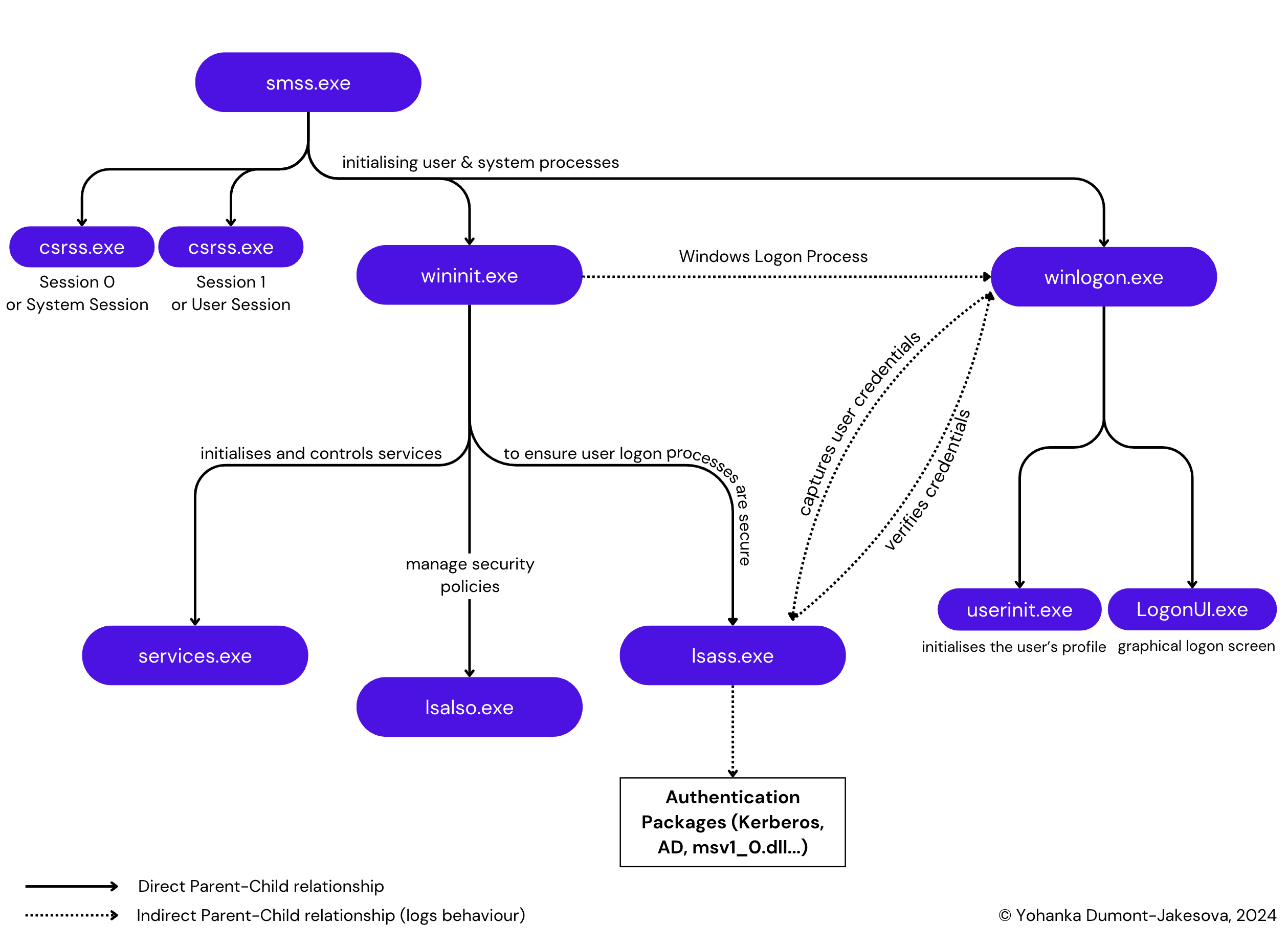
Recently, I attempted to participate in my first CTF, hosted by the DFIR Report. This experience humbled me and made me realise the knowledge gaps I have, particularly in one area: Windows processes. In this article, I document the normal behaviour of Windows authentication processes and log behaviour in Splunk. What you will read here is certainly not new, but it might serve as a helpful reference. This article is the first of a series, and is covering 4 crucial Windows processes. Since it can be confusing and hard to visualise, I’ve created a hierarchy map with parent/child relationships with its main function.
smss.exe
Description – smss.exe. The Session Manager Subsystem (smss.exe) starts all the crucial processes of Windows during the boot process. It starts the initialisation of the system and set up user environments and core processes.
Functions
- Initialises system → Session 0 or the System Session, exclusively for system processes and non-interactive user applications. On the other hand, Session 1 is session where user starts to interact with.
- Launch of system processes (Session 0):
csrss.exe– Client/Server Runtime Subsystemwininit.exe– Windows Initialisation process
- Launch & coordination of user processes (Session 1):
csrss.exeClient/Server Runtime Subsystemwinlogon.exeWindows Logon process
Note: smss.exe will exit soon after launching Session 1, it’s common to see winlogon.exe and csrss.exe without parent processes. It can also explain why we see winlogon.exe having wininit.exe as a parent process.
- Path – %SystemRoot%\System32\smss.exe
- Parent Process – System
- Child Process :
csrss.exe(Client/Server Runtime Subsystem)wininit.exe(Windows Initialisation process)- Not directly a child process but can be associated with
winlogon.exe(Windows Logon process)
- Privilege – Runs with high privileges (SYSTEM account) as a system-level process
Log Context
Process Creation (Event Code 1) → During the normal boot sequence, smss.exe is always launched by the System process (PID =4), which starts systems and user session and further launches two critical processes, csrss.exe and wininit.exe. This is translated by Event Code 1 in Sysmon, or 4688 in Windows Event Logs.

lsass.exe
Description – lsass.exe. The Local Security Authority Subsystem Service (LSASS) is a Windows service responsible for enforcing the security policy on the system.
Functions
- Verifies users logging in
- Handles password changes
- Creates access tokens
Note : Those operations lead to the storage of credential material in the process memory of LSASS.
- Path – %SystemRoot%\System32\lsass.exe
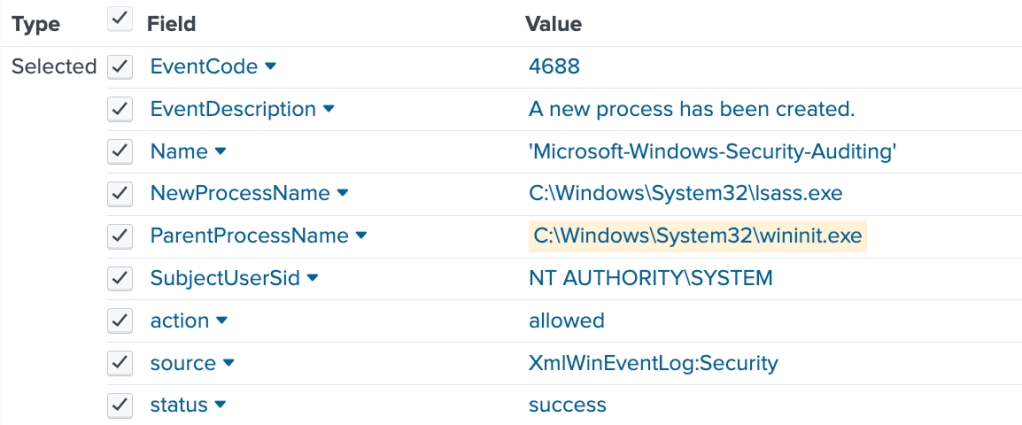
- Parent Process –
wininit.exe - Child Process – Not supposed to have one
- Privilege – Runs with high privileges (SYSTEM account) and manages authentication tokens.
Log Context
Process Creation (Event Code 1) → Process creation during authentication or session management
Lsass.exe may not always have a parent process (as we see on the Splunk screenshot), as it is part of core Windows system initialisation.

Process Execution (Event Code 10) → In Sysmon, Event Code 10 is activated when one process initiates the execution of another process.
Fields to be careful about:
- One field to examine in this Sysmon event is the ‘
GrantedAccess‘ field , which will provide insight into the specific permissions involved. - ‘
TargetImage‘ is not always a child process of the ‘SourceImage’. Parent-child process relationships are best tracked using Event Code 1 (Process Creation – detailed in the previous section). - Event Code 10 is particularly helpful for detecting
lsasscredential dumping attempts (e.g., Mimikatz, Nano dump, etc.). For instance, if a process requests access to lsass and specific permissions like ‘0x1010’ or ‘0x1410’ are involved, this could indicate malicious activity. - Normally very few processes should access
lsass.exe, some might be legitimate, like :- Windows Defender or other security software.
- Task Manager or Performance Monitor (when running with elevated privileges).
- Debugging tools
lsass.exe handles the authentication of users logging into the system. It manages login credentials (such as usernames and passwords), authenticates them, and determines access privileges. When a user logs in, lsass.exe interacts with the Security Accounts Manager (SAM), Active Directory, or even winlogon.exe to validate the credentials. However, it should not be launched by a user process.
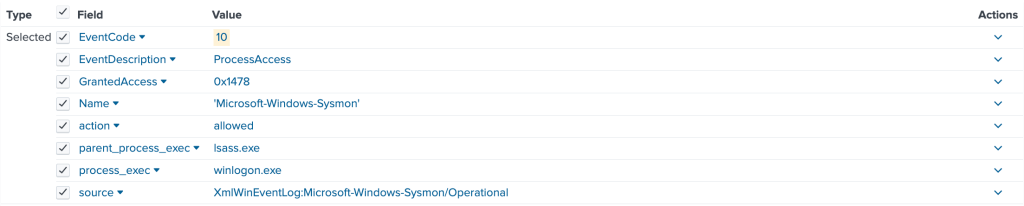
Image Loaded (Event ID 7) → lsass.exe process will load standard Windows libraries, located from trusted locations, such as C:\\Windows\\System32, and are signed by Microsoft. For example:
lsasrv.dll– Core security DLL – Responsible of decrypting all local password hashing schemesmsv1_0.dll– MSV authentication package – Handles NTLM (NT LAN Manager) authentication for local and domain logonskerberos.dll– Kerberos-based authentication within Windows domainsdpapisrv.dll– Data Protection API service DLL – Manages secure storage and encryption of sensitive data like user credentials.schannel.dll– Secure Channel DLL – Provides SSL/TLS support for secure communications between clients and servers.secur32.dll– Security Support Provider Interface DLL – Provides support for security protocols like NTLM, Kerberos, and Schannel for secure communications between clients and servers.wmi.dll– Windows Management Instrumentation DLL – Facilitates interactions with WMI for managing system and security information.
Note : DLLs are not child processes in the traditional sense (as in separate executable processes), they operate within the address space of lsass.exe and are utilized by it for various authentication and security functions. Monitoring which DLLs are loaded, and are legitimate or not, may help you spot malicious activity.
winlogon.exe
Description – winlogon.exe or Windows Logon is handling user logon and authentication processes.
Functions
- Interacts with
lsass.exefor credential validation and session management. - User logon process (logon & logoff)
- Loads user-specific settings and its desktop environment
- Path – %SystemRoot%\System32\winlogon.exe
- Parent Process – Should be
smss.exe - Child Process –
AtBroker.exe→ facilitates accessibility applicationsLogonUI.exe→ responsible for the logon user interface, including the lock screen and user authentication UIdwm.exe→ manages visual effects on the desktop, such as transparency and window animationsuserinit.exe→ initialises the user environment after a successful logon, setting up user settings and profiles.wlrmdr.exe→ relates to Remote Desktop Protocol (RDP) functionality, managing remote sessions
- Privilege – Runs with high privileges (SYSTEM account), specifically as a system process in the Local System account
Log Context
Process Creation (Event Code 1) → winlogon.exe has smss.exe (Session Manager Subsystem) as its parent process in Sysmon Event ID 1. This reflects the Windows startup sequence, where the Session Manager (smss.exe) initializes user sessions and starts winlogon.exe as part of the user authentication process. Anything else would be suspicious.
Process Execution (Event Code 10) → winlogon.exe can be accessed by other system processes that interact with user sessions or manage authentication processes. Some of the legitimate processes that might interact with winlogon.exe :
fontdrvhost.exe– Plays a crucial role in font management and rendering within the Windows environment. It works alongsidewinlogon.exeto ensure that text is displayed correctly in the user interface during and after the login process.lsass.exe– As seen in thelsass.exesection,winlogonandlsasscan interact with each other. Oncewinlogon.execaptures user credentials, it passes them tolsass.exefor verification.LogonUI.exe– Oncewinlogon.exedetects a logon event (like pressing Ctrl+Alt+Del), it startsLogonUI.exe, which displays the graphical logon screen (username/password prompt, biometric or smart card login interfaces).userinit.exe– If authentication is successful,winlogon.exestartsuserinit.exe.userinit.exeinitializes the user’s profile, runs login scripts, and mounts network drives.dwm.exe– Once the user environment is set up,userinit.exelaunchesexplorer.exe, which in turn leads to the activation ofdwm.exe.dwm.exeenhances the graphical interface, providing effects like window transparency and smooth animations.
wininit.exe
Description – wininit.exe or Windows Initialise process, is the process in the Windows operating system responsible for initialising system processes after the operating system kernel has loaded. It plays a key role during the boot process and user session initialisation.
Functions
- Session initialisation: Responsible for starting user sessions and initiating system services necessary for user interaction.
- Launching Essential Processes: Starts critical processes like
services.exe(Service Control Manager) andwinlogon.exe. - Resource Management: Prepares system resources and handles initialisations needed for running background services.
- Path – C:\Windows\System32\wininit.exe
- Parent Process –
smss.exe - Child Processes –
services.exe: Starts the Service Control Manager, which manages system services.winlogon.exe: Initiates the logon process for user sessions.lsass.exe: Local Security Authority Subsystem Servicelsalso.exe: Local Security Authority Service
- Privilege – Operates with system-level privileges, managing critical startup processes without direct user interaction
Log Context
Process Creation (Event Code 1) → wininit.exe should be created by smss.exe as part of the system boot sequence, and subsequently initiate services.exe and winlogon.exe.
Process Execution (Event Code 10) → wininit.exe can be accessed by several processes, such as:
winlogon.exe: After startingservices.exe,wininit.exelauncheswinlogon.exe, as the latter is responsible for handling user authentication and session management. For example, it monitor secure logon processes, such as the CTRL+ALT+DEL sequence.services.exe: When Windows boots,wininit.exestartsservices.exeas one of its child processes. This process initialises and controls services, ensuring they start and operate correctly during the system’s boot sequence.lsass.exe: This process operates under the control ofwinlogon.exebut is not directly created bywininit.exe. lsass.exe will validate user credentials logon. See section onlsass.exeLsalso.exe: Sister oflsass.exe, or Local Security Authority Service, which works closely withlsass.exeto manage security policies. Again; this process is indirectly started bywininit.exe
That concludes the first part of Windows Processes. More to come !
Source : Mainly the SANS poster about Hunting Evil https://www.sans.org/posters/hunt-evil/
 ozales
Leave a comment